
ROS 2
Get live Hydris data in ROS 2, then send ROS data to Hydris
The ROS 2 plugin exposes Hydris as ROS 2 node over DDS.
Getting started
1. Start Hydris
The plugin needs Hydris 1.1 or later on Linux (x86_64 or ARM64).
Download the Linux binary. Start it:
chmod +x hydris
./hydris
docker run --net host -ti ghcr.io/projectqai/hydris:latestUse --net host. ROS 2 discovery uses multicast. Multicast does not go through the default Docker network.
Open http://localhost:50051.
2. Enable the Simulated Radar
- Push
Ctrl+K(⌘+Kon macOS). Select Configuration. - Open Mission → Playground.
- Set Enable Simulated Radar to on. Click Apply Configuration.
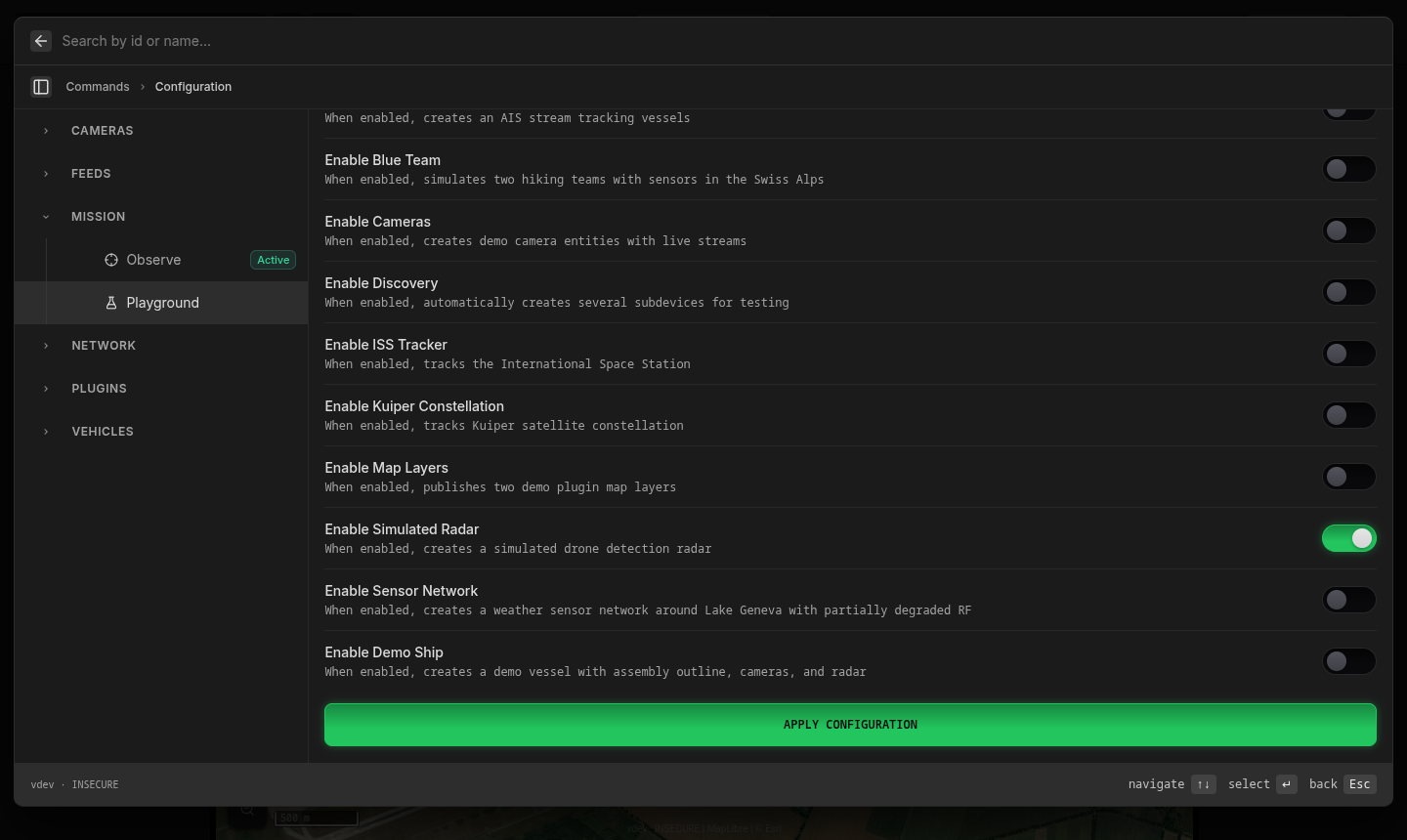
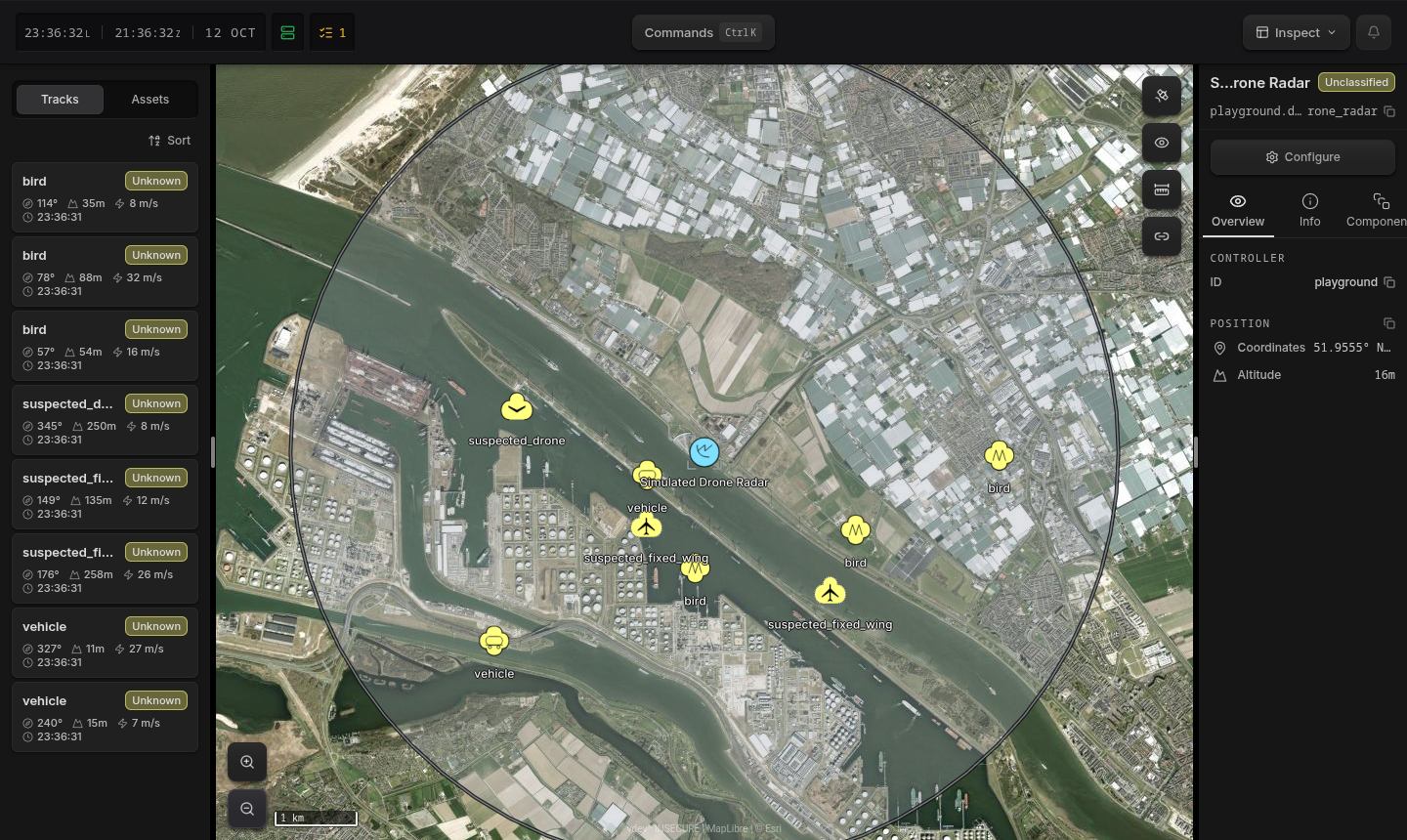
A simulated radar starts in the port of Rotterdam. It has eight moving tracks: drones, aircraft, birds, and ground vehicles.
To see the radar on the map:
- Push
Ctrl+K. Search for Simulated Drone Radar. - Select it under Assets.
- Zoom out three or four steps.
3. Enable the ROS 2 Plugin
- Push
Ctrl+K. Select Manage plugins. - Open Open Source Plugins → ROS 2.
- Set Enabled to on. Click Apply Configuration.
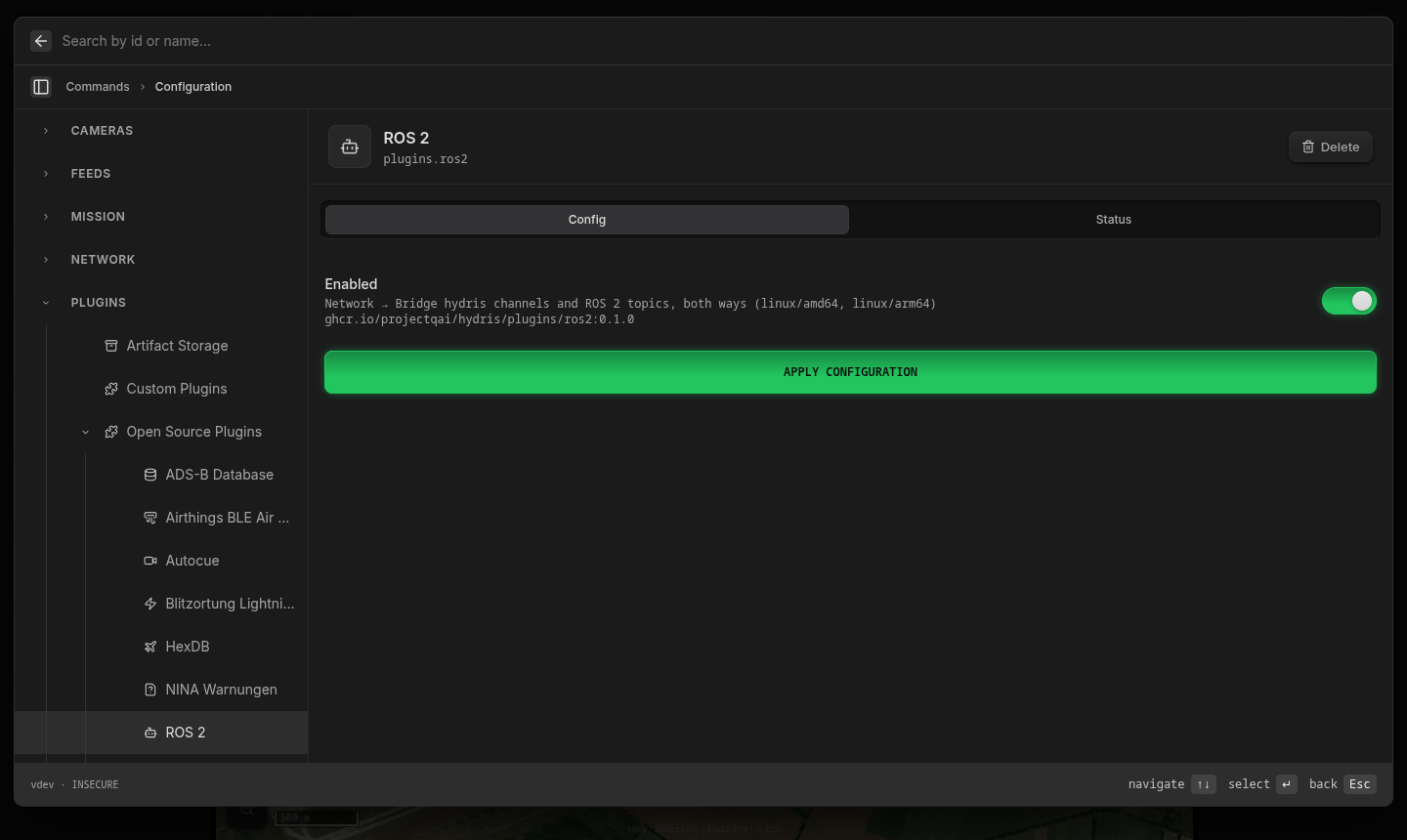
Hydris downloads and starts the plugin. The plugin sends no data until you add a channel.
4. Add a Channel
- Push
Ctrl+K. Select Configuration. - Open Network → ROS 2.
- Click Add. Click Create Channel.
- Set Encoding to
json. Keep the other settings. - Click Apply Configuration.
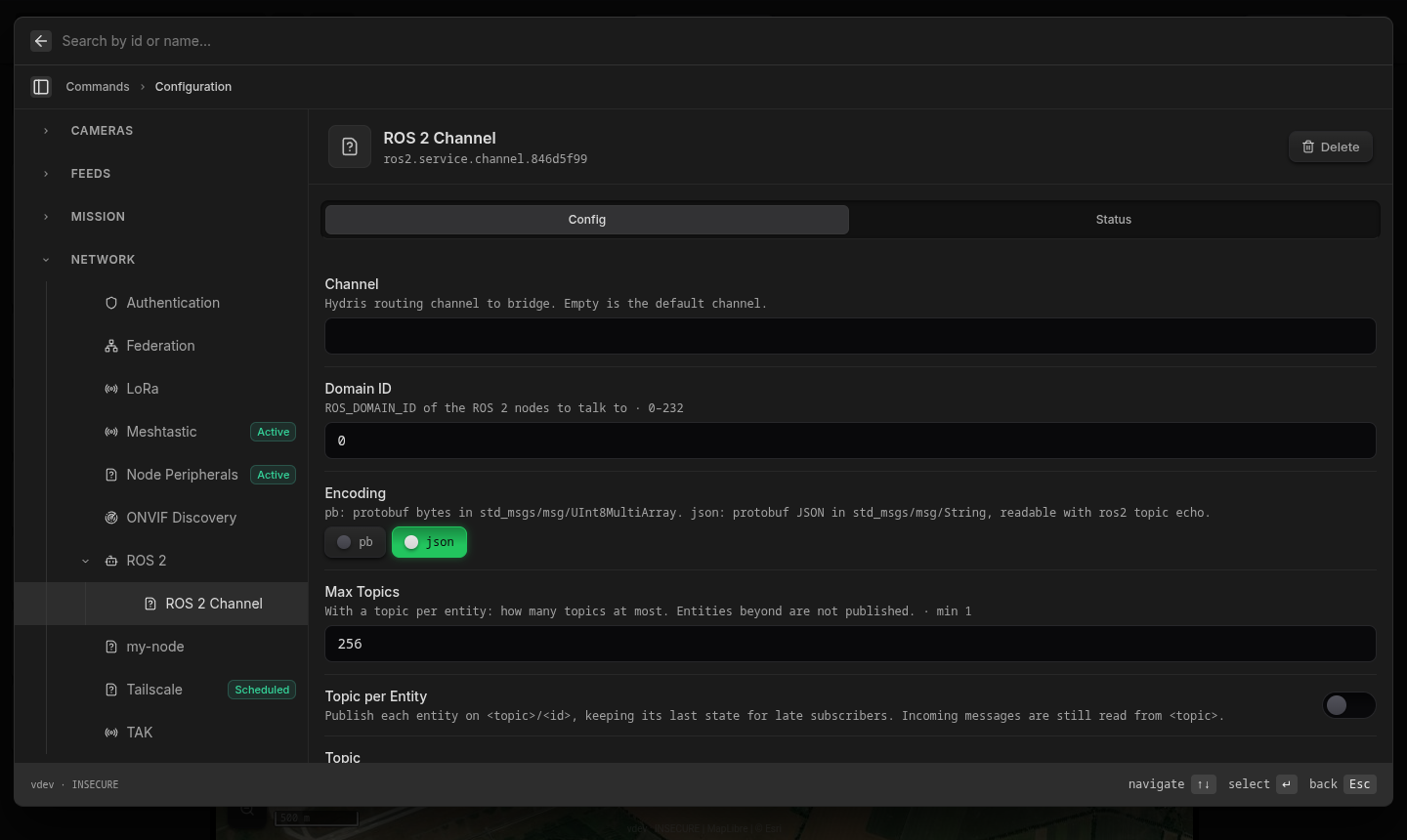
The channel shows Active. Hydris publishes on /hydris/default, DDS domain 0.
5. Read the Data in ROS
Use a ROS 2 environment on the same computer or network. This example uses Jazzy in Docker:
docker run -it --rm --net host ros:jazzy-ros-base bash
source /opt/ros/jazzy/setup.bash
$ ros2 topic list
/hydris/default
/parameter_events
/rosout
$ ros2 topic info /hydris/default
Type: std_msgs/msg/String
Publisher count: 1
Subscription count: 1
$ ros2 topic hz /hydris/default
average rate: 12.401The subscription is the plugin. It reads messages from ROS (step 6).
$ ros2 topic echo --full-length /hydris/default
data: '{"entity":{"id":"playground.discovered.drone_radar.track.0","label":"suspected_fixed_wing","controller":{"node":"1c08fe067470424c","origin":"node.1c08fe067470424c"},"lifetime":{"from":"2026-10-12T21:22:05.810670893Z","until":"2026-10-12T21:22:18.810179608Z","fresh":"2026-10-12T21:22:05.810670893Z"},"routing":{"channels":[{}]},"geo":{"longitude":4.152598649606439,"latitude":51.951620627686246,"altitude":71.02202679676307},"symbol":{"milStd2525C":"SPAPMF----*****"},"track":{"tracker":"playground.discovered.drone_radar","history":"playground.discovered.drone_radar.track.0.history"},"kinematics":{"velocityEnu":{"east":-8.852264673911147,"north":15.816817235616067,"up":0}},"classification":{"dimension":"ClassificationBattleDimensionAir","identity":"ClassificationIdentityPending","taxonomy":[{"confidence":{"pending":true},"vehicle":{"air":{"fixed_wing":{}}}}]},"administrative":{"length_m":0.5,"width_m":0.5,"height_m":0.2,"images":["playground.discovered.drone_radar.droneimage"]}},"t":"EntityChangeUpdated"}'
---
Use --full-length. Without it, ros2 topic echo cuts strings at 128 characters.
6. Send Data to Hydris
Publish a robot near the radar:
ros2 topic pub --once /hydris/default std_msgs/msg/String \
  '{data: "{\"changes\":[{\"id\":\"ros.robot1\",\"label\":\"My ROS robot\",\"geo\":{\"latitude\":51.958,\"longitude\":4.165},\"classification\":{\"identity\":\"ClassificationIdentityFriend\",\"taxonomy\":[{\"vehicle\":{\"unmanned\":{},\"land\":{}}}]}}]}"}'
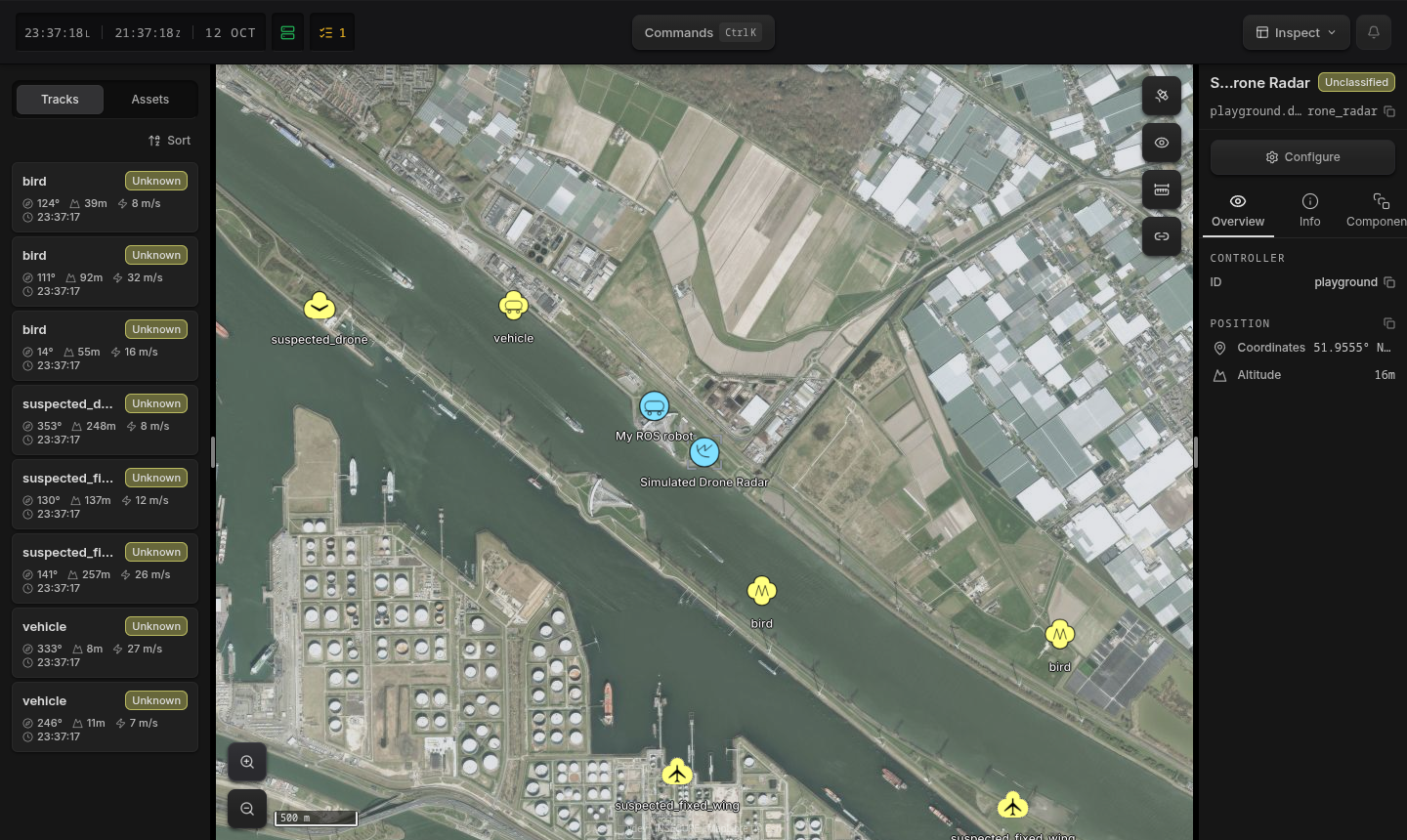
My ROS robot shows on the map next to the radar, as a friendly unmanned ground vehicle:
What You See
Hydris
Hydris keeps a world model. The world model is one shared list of all the things in an operation: tracks, drones, vehicles, cameras, and sensors. Each thing is an entity.
- Sources write entities: radars, ADS-B and AIS feeds, drones, cameras, and ROS nodes.
- Consumers read entities: the map, other Hydris nodes, plugins, and ROS.
- Hydris merges the data for each entity. It removes old entities. It shares the result on the network.
Entities and Components
An entity is an ID and a set of components. An entity has no type field. Its components tell what it is:
- A radar track has
geo,kinematics,classification, andtrack. - A camera has
camera. - The radar has
deviceandsensor.
Refer to Understanding Entities.
The track from step 5:
{
  "entity": {
    "id": "playground.discovered.drone_radar.track.0",
    "label": "suspected_fixed_wing",
    "controller": { "node": "1c08fe067470424c", "origin": "node.1c08fe067470424c" },
    "lifetime": {
      "from":  "2026-10-12T21:22:05.810670893Z",
      "fresh": "2026-10-12T21:22:05.810670893Z",
      "until": "2026-10-12T21:22:18.810179608Z"
    },
    "routing": { "channels": [{}] },
    "geo": { "latitude": 51.951620627686246, "longitude": 4.152598649606439, "altitude": 71.02 },
    "kinematics": { "velocityEnu": { "east": -8.85, "north": 15.82, "up": 0 } },
    "track": {
      "tracker": "playground.discovered.drone_radar",
      "history": "playground.discovered.drone_radar.track.0.history"
    },
    "classification": {
      "dimension": "ClassificationBattleDimensionAir",
      "identity": "ClassificationIdentityPending",
      "taxonomy": [{ "confidence": { "pending": true }, "vehicle": { "air": { "fixed_wing": {} } } }]
    },
    "symbol": { "milStd2525C": "SPAPMF----*****" },
    "administrative": { "length_m": 0.5, "width_m": 0.5, "height_m": 0.2, "images": ["playground.discovered.drone_radar.droneimage"] }
  },
  "t": "EntityChangeUpdated"
}| Field | Meaning |
|---|---|
id | The name of the entity. All updates to an entity have the same ID. |
label | The name on the map. For this track, the radar classification. |
controller | The Hydris node (node) and the entity (origin) that put the entity into the world. |
lifetime | from: the entity starts. fresh: the last update. until: the entity expires. This track expires approximately 13 seconds after the last radar update. |
routing | The channels that share the entity outside this Hydris node. {} is the default channel. Refer to Channels and Topics. |
geo | WGS 84 position in degrees. altitude is in meters above the ellipsoid. |
kinematics.velocityEnu | Velocity in m/s, East-North-Up, as in ROS REP 103. |
track | tracker is the entity that keeps this track: the radar. history is the entity with the track trail. |
classification | What the target is (here a fixed-wing aircraft, not confirmed) and its identity: pending, friend, hostile, and others. |
symbol | The map symbol, as a MIL-STD-2525C code. |
administrative | Size in meters and the IDs of image entities. |
t | The change: EntityChangeUpdated, EntityChangeExpired (the lifetime ended, or a user removed the entity), or EntityChangeUnobserved (the entity exists, but this channel no longer routes it). |
Most entities have only some components. Make sure that your node checks for the components it uses. Refer to the component reference.
Message Rate
The topic has approximately 12 messages per second:
- The radar updates 8 tracks one time each second.
- Each track has a trail entity (
….track.N.history) that also changes. - The radar, its coverage area, and an image are also entities.
Each message is one change. Hydris does not send entities that do not change. To get only targets, use the entities that have a track component.
Channels and Topics
Hydris shares an entity only if the entity has a routing component. Configuration, plugins, and other internal entities stay local. routing gives one or more channels. Channels control where data goes. The radar routes its tracks to the default channel. Thus they go to /hydris/default. Refer to Routing & Federation.
A ROS 2 channel connects one Hydris channel to one ROS topic:
| Hydris channel | ROS topic |
|---|---|
| default (empty name) | /hydris/default |
ops.blue | /hydris/ops_blue (changed to a valid ROS name) |
| any, with Topic set | the topic that you set |
To publish different entities, route them to a different channel. Then add a ROS 2 channel for it.
Send Data to Hydris
The topic also reads messages from ROS. Each message is a world.EntityChangeRequest. The Hydris API uses the same message.
{
  "changes": [
    {
      "id": "ros.robot1",
      "label": "My ROS robot",
      "geo": { "latitude": 51.958, "longitude": 4.165 },
      "classification": {
        "identity": "ClassificationIdentityFriend",
        "taxonomy": [{ "vehicle": { "unmanned": {}, "land": {} } }]
      },
      "lifetime": { "until": "2026-10-12T22:00:00Z" }
    }
  ]
}changes: each component that you send replaces that component. Hydris keeps the components that you do not send. Thus a node can send onlygeo. To replace the full entity, usereplacements.- Map symbol: Hydris shows an entity on the map only if it has a position and a symbol. Hydris makes the symbol from
classification:taxonomytells what the thing is, andidentitytells whose it is. You can also setsymbol.milStd2525C. Without a symbol, Hydris keeps and publishes the entity, but does not show it. - IDs: use your own prefix, for example
ros.. Keep the ID the same for each update. - Routing: if an entity has no
routing, Hydris routes it to the channel that it came from. Thus Hydris also publishes it on the topic and to other Hydris nodes. - Lifetime: set
untila few update periods in the future. Move it forward with each update. If your node stops, its entities expire.
The plugin does not read its own messages. It ignores entities that other Hydris nodes published. Thus two Hydris nodes on one ROS domain do not send the same data around in a loop.
Use It in Your Nodes
JSON or Protobuf
Hydris messages are Protocol Buffers in standard ROS types. Each channel has one encoding:
| Encoding | ROS type | Use |
|---|---|---|
json | std_msgs/msg/String | ros2 topic echo, scripts, any JSON parser |
pb (default) | std_msgs/msg/UInt8MultiArray | Nodes: smaller, faster, and typed |
JSON field names follow the protobuf JSON mapping. Both encodings ignore unknown fields. Thus you can update Hydris and your nodes at different times.
Python Node
-
Install the Hydris protobuf bindings in your ROS environment:
pip install "git+https://github.com/projectqai/proto.git#subdirectory=python" -
Add a channel. Set Encoding to
pband Topic to/hydris/radar_pb. -
Run this node:
import rclpy
from rclpy.node import Node
from std_msgs.msg import UInt8MultiArray
from platform_proto.world_pb2 import EntityChange, EntityChangeEvent


class RadarListener(Node):
    def __init__(self):
        super().__init__("radar_listener")
        self.create_subscription(UInt8MultiArray, "/hydris/radar_pb", self.on_event, 100)

    def on_event(self, msg):
        ev = EntityChangeEvent()
        ev.ParseFromString(bytes(msg.data))
        e = ev.entity
        if not e.HasField("track"):
            return  # only radar tracks, not their trails or the radar itself
        self.get_logger().info(
            f"{EntityChange.Name(ev.t)} {e.id} ({e.label}) "
            f"at {e.geo.latitude:.5f}, {e.geo.longitude:.5f}, {e.geo.altitude:.0f} m"
        )


rclpy.init()
rclpy.spin(RadarListener())
[INFO] [radar_listener]: EntityChangeUpdated playground.discovered.drone_radar.track.6 (suspected_fixed_wing) at 51.94354, 4.13294, 119 m
[INFO] [radar_listener]: EntityChangeUpdated playground.discovered.drone_radar.track.1 (vehicle) at 51.95231, 4.16943, 14 m
[INFO] [radar_listener]: EntityChangeUpdated playground.discovered.drone_radar.track.7 (drone) at 51.95307, 4.22205, 39 mTo send data, make a world_pb2.EntityChangeRequest. Serialize it with SerializeToString(). Publish it as data of a UInt8MultiArray.
For C++ and other languages, generate bindings from the .proto files in the proto repository.
One Topic for Each Entity
A channel has one shared topic. A subscriber that starts late gets an entity only at its next change.
Set Topic per Entity to on. Then each entity has its own topic, and the topic keeps the last state for late subscribers:
$ ros2 topic list
/hydris/tracks
/hydris/tracks/playground_discovered_drone_radar
/hydris/tracks/playground_discovered_drone_radar_track_0
/hydris/tracks/playground_discovered_drone_radar_track_0_history
/hydris/tracks/playground_discovered_drone_radar_track_1
…- The plugin changes entity IDs to valid topic names:
.becomes_. - When an entity expires, the plugin sends
EntityChangeExpired. Then it removes the topic. - The plugin reads messages from ROS on the base topic only (
/hydris/trackshere). - Max Topics (default 256) sets the maximum number of topics for a channel.
Use this function for a small number of important entities.
QoS
| Reliability | Durability | History | |
|---|---|---|---|
| Channel topic | reliable | volatile | keep last 1000 |
| Per-entity topics | reliable | transient local | keep last 1 |
| Plugin reader | reliable | volatile | keep last 1000 |
A best effort subscriber can read both topic types. A publisher that sends to Hydris must be reliable.
Configuration Reference
| Setting | Default | Description |
|---|---|---|
| Channel | (default channel) | The Hydris routing channel |
| Topic | /hydris/<channel> | The ROS topic. The default channel uses /hydris/default. |
| Topic per Entity | off | Publish each entity on <topic>/<id>. Each topic keeps the last state. |
| Max Topics | 256 | With Topic per Entity: the maximum number of topics. When the channel has this number, it does not publish new entities and shows Degraded. |
| Encoding | pb | pb: protobuf in std_msgs/msg/UInt8MultiArray. json: protobuf JSON in std_msgs/msg/String. |
| Domain ID | 0 | The ROS_DOMAIN_ID of your ROS nodes |
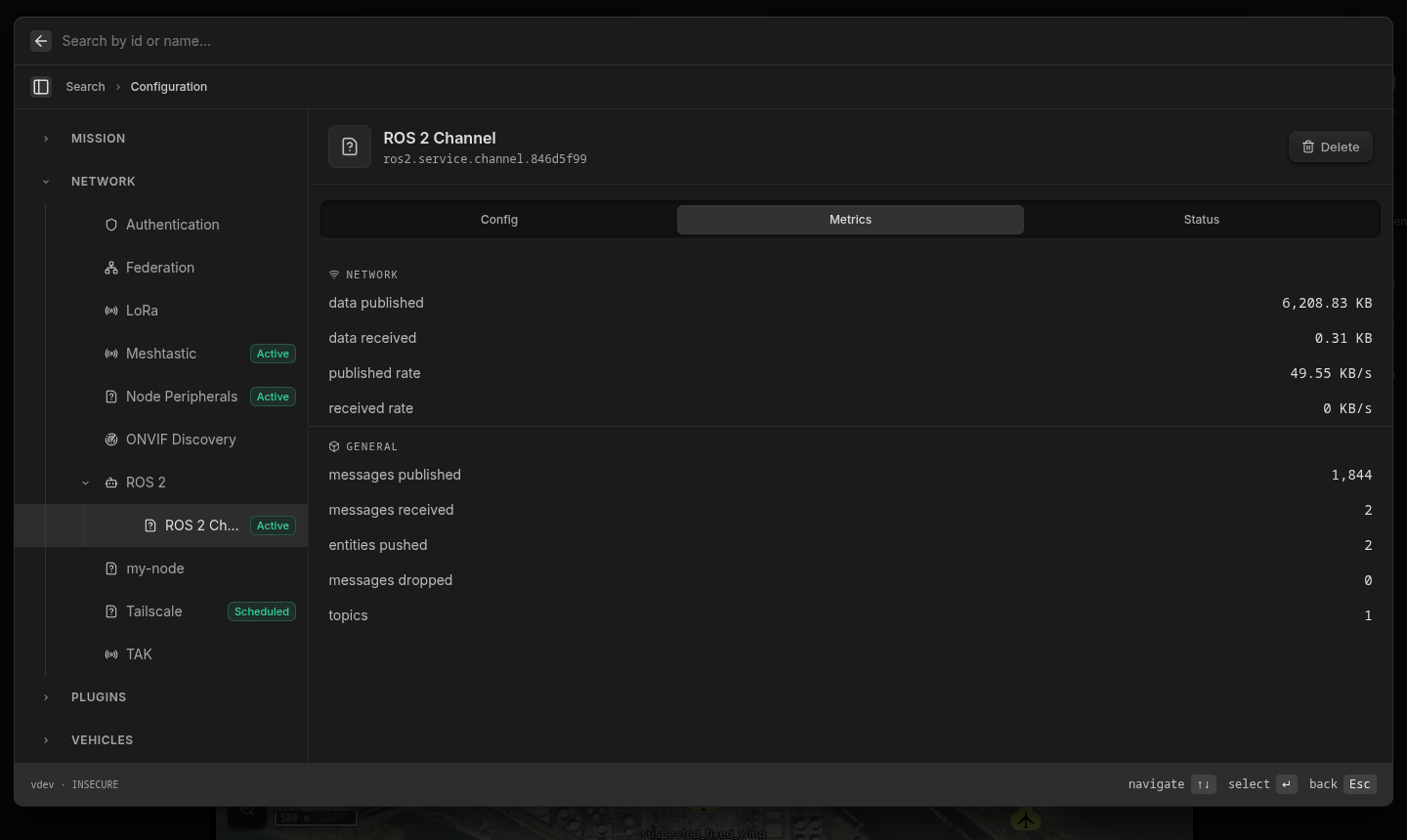
The Status tab of a channel shows its health. The Metrics tab shows:
- Messages and data published and received
- Entities pushed into Hydris
- Messages dropped
- Number of topics
- Data rates
Troubleshooting
| Problem | Do this |
|---|---|
No /hydris/… topics | Make sure that ROS_DOMAIN_ID is the same as the channel Domain ID. Use --net host for all containers. Make sure that the network permits multicast. |
ros2 topic echo shows nothing | Use the type of the encoding: std_msgs/msg/String for json, std_msgs/msg/UInt8MultiArray for pb. If a subscriber uses the wrong type, ros2 topic info shows two types. If you do not give a type, ROS uses the type of the publisher. |
| The topic has no messages | Make sure that the entities have routing to the Hydris channel. Hydris does not publish local entities. |
| The plugin shows a conflict | Use Hydris on Linux x86_64 or ARM64. |
| A large message from a new publisher does not arrive | Cyclone DDS drops the first fragmented message (larger than approximately 64 KB) from a new publisher. Later messages arrive. Publish a stream, not one large message. |
The plugin is not in ros2 node list | This is correct. The plugin does not show as a ROS node. Its topics work. |
The plugin uses DDS. We tested it with Fast DDS and Cyclone DDS on ROS 2 Jazzy. ROS nodes with rmw_zenoh cannot connect to it.