
Share the Picture
Integrate with downstream situational awareness systems and command applications
What is a Downstream?
A downstream is any system that consumes the Hydris picture—a situational awareness system or a command application used for coordination in military, emergency response, and other team operations. Downstreams display real-time positioning, sensor data, and mission-critical information on a common operating picture.
In the open source version of Hydris, we support integration with ATAK (Android Team Awareness Kit), a widely-used tactical awareness platform. Hydris can broadcast its situational awareness picture to ATAK, allowing teams to visualize entities, detections, and tracks directly within their ATAK clients for Android, Windows and iPhone.
For integration with national BMS platforms, contact us.
Adding a TAK Connection
- Open the command menu with
Ctrl+K(or⌘+Kon macOS) and select Configuration - Navigate to Network → TAK
- Click + Add
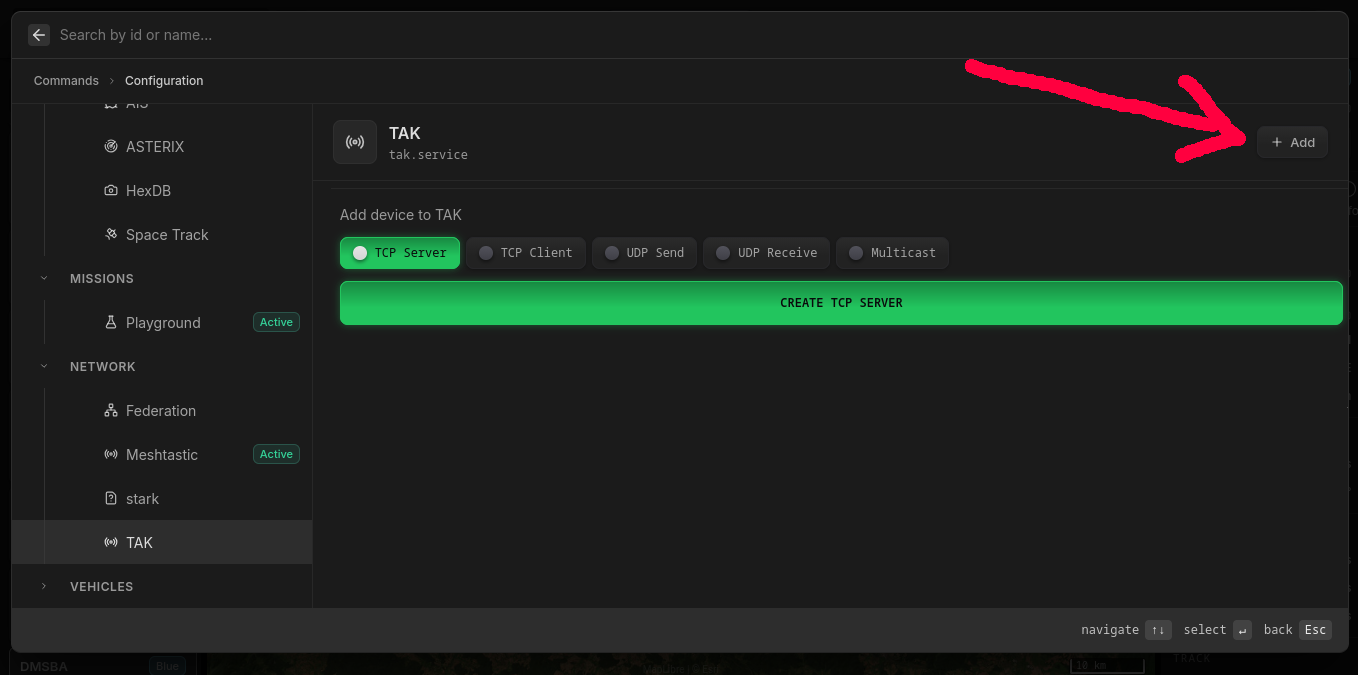
You can choose from several connection modes:
- TCP Server — Hydris runs a TAK server that ATAK clients connect to. Works across different networks and NAT boundaries.
- TCP Client — Hydris connects to an existing TAK server as a client.
- UDP Send / UDP Receive — Send or receive over UDP unicast.
- Multicast — Broadcasts to the SA Mesh network. Requires Hydris and ATAK clients to be on the same L2 network.
Connecting ATAK to hydris TAK TCP Server
After creating a TCP Server in Hydris:
- Open ATAK on your device
- Navigate to Settings → Network Preferences → TAK Servers
- Press ⋮ (top right) → Add
- Enter the IP address of the device running Hydris
- Under Advanced Options, select TCP as the streaming protocol
- Save and connect
ATAK will now receive real-time entity updates from Hydris and display them on the map.
What Gets Shared
When connected to ATAK, Hydris automatically shares:
- Entities with geospatial components — All entities with position data appear on the ATAK map
- Symbols — MIL-STD-2525C symbols are translated to ATAK's symbol format
- Tracks — Fused tracks from multiple sensors
- Detections — Raw sensor detections with bearing information
- Metadata — Entity labels, classifications, and timestamps
Only entities with geo components are visualized in ATAK — other entities remain in the awareness picture for programmatic access.