
Offline Maps
Load .mbtiles tilesets so the map works without internet
Hydris can render .mbtiles tilesets as basemaps. Once loaded, the map works with no network, useful for field deployments, or regions where online providers are unreliable.
Loading a tileset
Two ways to upload an .mbtiles file:
- Drag and drop the file anywhere on the window
- Open command palette (
Ctrl+K) and select Import offline map
The file is stored inside Hydris and persists across restarts. A short toast confirms the upload.
Selecting an offline map
Open the base layer menu (top right of the map). Uploaded tilesets appear as radio options alongside Dark, Satellite, and Street. Pick one to swap the map style.
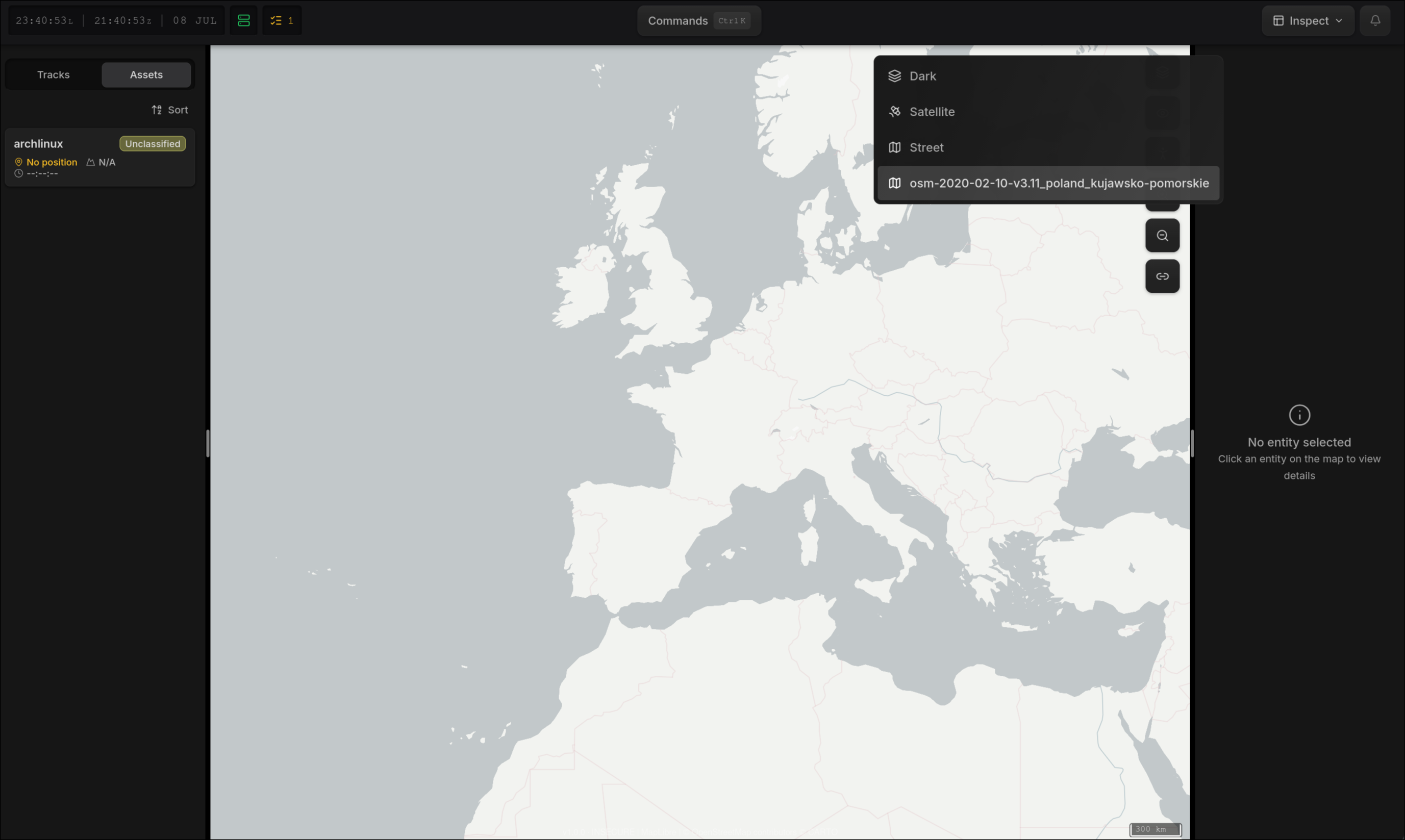
If a mission is loaded that doesn't include the tileset, the map falls back to the last online basemap automatically.
Where to get tilesets
Download pre generated tilesets from MapTiler:
| Source | Notes |
|---|---|
| MapTiler extracts | Custom extracts by country or region. |
| MapTiler planet | Full planet download. |
Vector and Raster
Both formats are supported and detected automatically. Raster tilesets (.png, .jpg, .webp) render with labels included. Vector tilesets (.pbf) render geometry only (roads, water, buildings...). Use raster if you need visible labels.